 Image 1 of 1
✓ Simple Installation
✓ Customizations available via CSS
✓ Mobile Friendly
Compatible with:
Squarespace Core (Business) plans and higher (not Basic (Personal) plans)
All Squarespace 7.1 Websites
Fluid Engine Compatible
We can't guarantee compatibility with any other custom code or third-party software. Get in touch with support if you have any questions.
Single License - Allowed for use on a single website.
Multi-Use License - Allowed for use on unlimited websites, and in Squarespace Templates for sale.
This plugin comes with copy-and-paste code to customize this to your design.
Our support services are provided on a best effort basis for the first 60 days after purchase.
We offer support for universal technical issues related to this plugin, but not for individualized installation, customization, or development services beyond what's presented on the installation page.
We can't guarantee compatibility with other plugins or third-party software.
✓ Use as part of a template you’re building
✓ Approved for use on unlimited websites
-
One-Time Purchase
Pay once and it’s yours. No subscription and no renewal fees.
-
Maintenance
We automatically update our plugins to stay up to date with Squarespace.
-
Support
We pride ourselves on our friendly, human support.
-
Simple Installation
Every plugin comes with clear instructions and copy-and-paste code.
Features
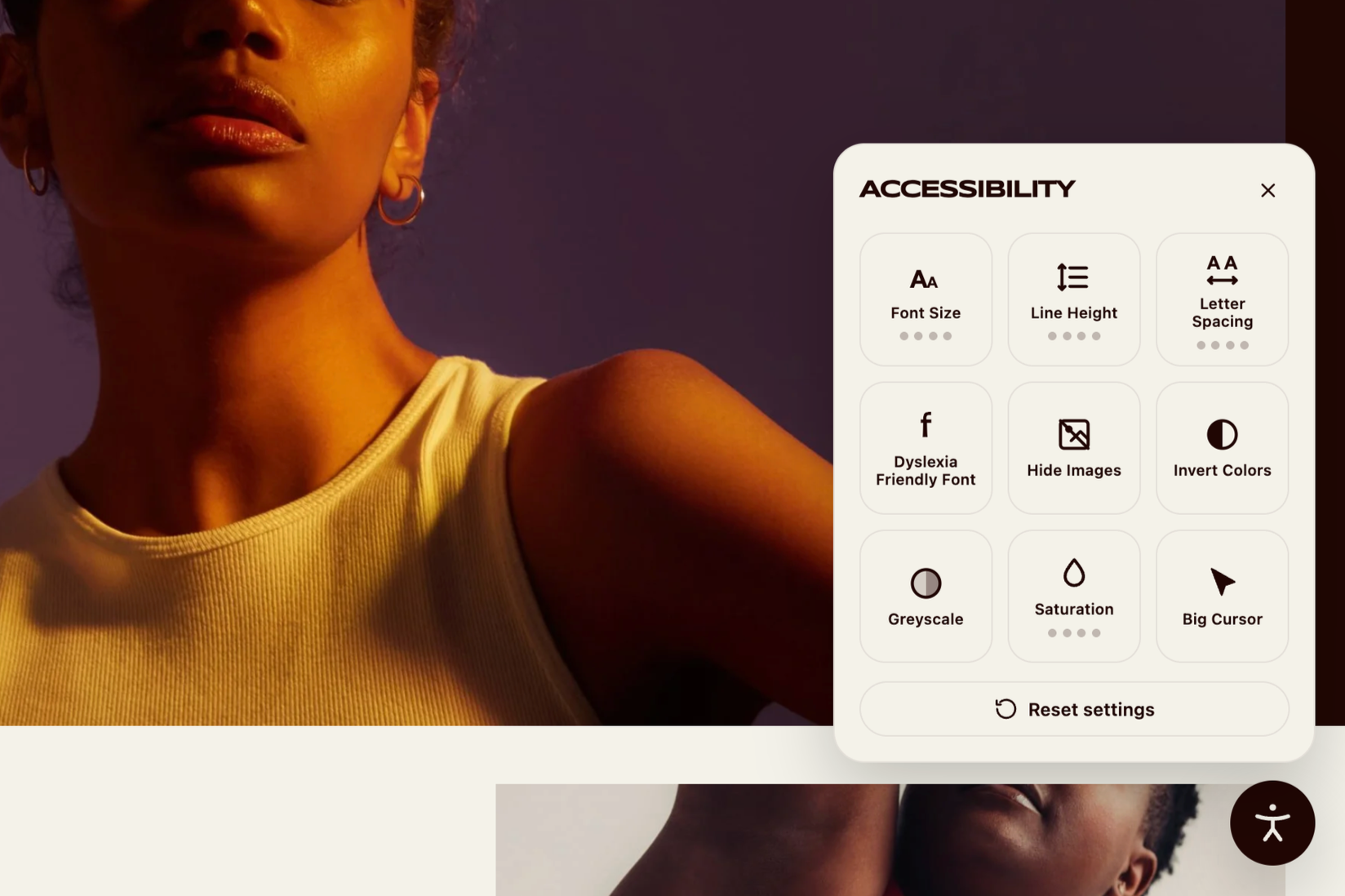
Font Size
Scales every bit of text on the page through four larger steps, up to 220% of its normal size.
Line Height
Opens up the space between lines of copy so dense paragraphs are easier to follow.
Letter Spacing
Widens the gap between characters in four steps, which helps letters stop running together.
Dyslexia Friendly Font
Swaps your site's typography for OpenDyslexic, a typeface designed to reduce letter swapping.
Hide Images
Removes photos, videos and background images so only the written content remains.
Invert Colors
Flips the page to its opposite colors for visitors who read more comfortably in high contrast.
Greyscale
Drops all color from the page, cutting visual distraction down to light and dark alone.
Saturation
Steps the intensity of your colors down gradually, for a softer page without going fully grey.
Big Cursor
Replaces the pointer with a much larger one that stays easy to track across the screen.